
Keysolved

Honda Pilot OBD port location

Three generations, 2009–2024. Pick yours.

2023–2024

4th gen

Location

Driver's side, under the dashboard, below the steering column. Port is angled downward — approach from below and angle the connector to seat it fully. No panel removal required.

No diagram for this one yet. Ask for one and we'll draw it. The more requests, the sooner.

Also on this Pilot

  • KeysSmart key
  • Tools confirmed4
  • Transponder chipSubscribers
  • Programming procedureSubscribers
Open the full Pilot 4th gen record

2016–2022

3rd gen

Location

Driver's side, under the dashboard, below the steering column. Port is angled downward — approach from below and angle the connector to seat it fully. No panel removal required.

No diagram for this one yet. Ask for one and we'll draw it. The more requests, the sooner.

Also on this Pilot

  • KeysSmart key
  • Tools confirmed4
  • Transponder chipSubscribers
  • Programming procedureSubscribers
Open the full Pilot 3rd gen record
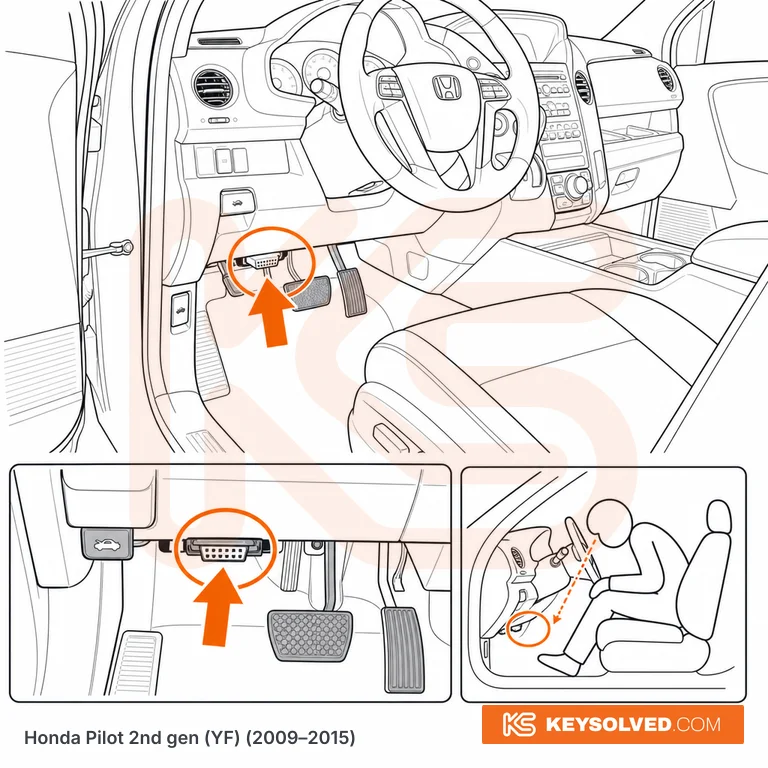
OBD port location in a Honda Pilot 2nd gen

2nd gen (YF) 2009–2015

Driver's side (LHD), low under the dash directly above the pedals, just left of the steering column. The white 16-pin connector sits below the lower dash trim near the hood-release lever and faces downward, so you crouch and look up under the dash to find it. Same position on all trims (LX, EX, EX-L, Touring). This generation Pilot was sold as a North American left-hand-drive model only.

Questions

Honda Pilot OBD questions

4th gen (2023–2024): Driver's side, under the dashboard, below the steering column. 3rd gen (2016–2022): Driver's side, under the dashboard, below the steering column. 2nd gen (2009–2015): Driver's side (LHD), low under the dash directly above the pedals, just left of the steering column.

Found the port. Now program the key.

Step-by-step add-key and all-keys-lost procedures for every Pilot, which of your tools will do it, and what catches people out.

Subscribe