
Keysolved

Ford F-250 Super Duty OBD port location

Four generations, 1999–2022. Pick yours.

2017–2022

4th gen Super Duty (P558)

Illustration — use it to know where to look.

Location

Driver's side, on the bottom edge of the lower dash directly under the steering column, above the pedals. The black 16-pin connector is exposed (no cover) and angled up toward the dash, so a bulky OBD plug or AKL cable head can foul the dash edge: tilt it in rather than pushing straight up. Same position on Regular Cab, SuperCab and Crew Cab, pickup and chassis cab (F-250 to F-550), gas and diesel; US and Canadian trucks are left-hand drive only. Fleet and ex-fleet trucks very often have a telematics or ELD box, or a pass-through harness, already plugged in: unplug it and make sure you are on the factory connector before you blame the tool. On 2022 trucks with the 4.2-inch or 8-inch screen the Gateway Module sits on the back of the connector and feeds its power (pin 16); a dead port on those trucks is often the gateway or its connector, not the tool.

Also on this F-250 Super Duty

  • KeysTransponder · Flip remote · Smart key
  • Tools confirmed11
  • Transponder chipSubscribers
  • Programming procedureSubscribers
Open the full F-250 Super Duty 4th gen Super Duty record

2011–2022

Gen 3-4 (P473/P558)

Location

Under the driver's side dashboard, left of center, adjacent to the emergency brake release and fuse panel area. Accessible without tools, faces downward-forward. Standard 16-pin DLC.

No diagram for this one yet. Ask for one and we'll draw it. The more requests, the sooner.

Also on this F-250 Super Duty

  • KeysFlip remote · Smart key
  • Tools confirmed5
  • Transponder chipSubscribers
  • Programming procedureSubscribers
Open the full F-250 Super Duty Gen 3-4 record
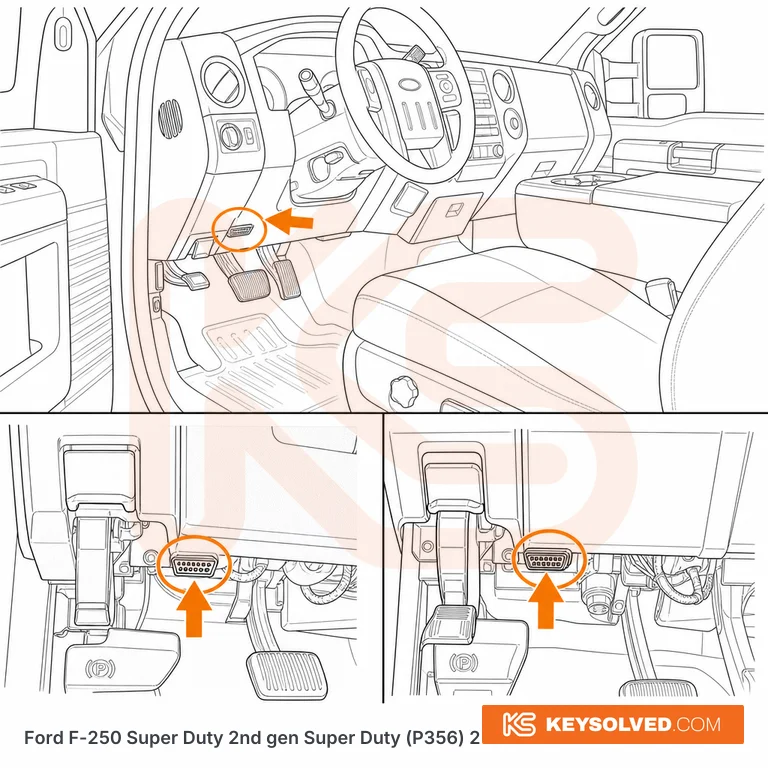
OBD port location in a Ford F-250 Super Duty 2nd gen Super Duty

2nd gen Super Duty (P356) 2008–2016

Driver's side, on the bottom edge of the lower dash directly under the steering column, right beside the parking brake release handle (the connector sits just to the right of the release, above the pedal-operated parking brake). The 16-pin connector faces down, so look up under the dash edge with a torch rather than straight at it. Same position on 2008-2010 and 2011-2016 trucks, Regular Cab, SuperCab and Crew Cab, pickup and chassis cab, gas and diesel; US trucks are left-hand drive only. Fleet trucks often have a telematics box or an engine monitor plugged into the port or a pass-through harness hanging off it: unplug it and make sure you are on the factory connector before blaming the tool.
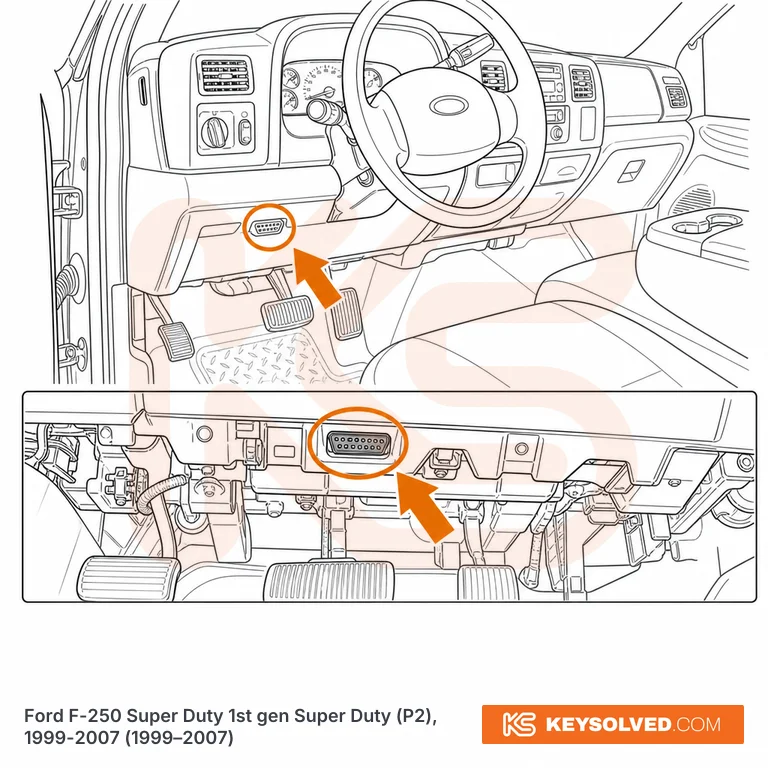
OBD port location in a Ford F-250 Super Duty 1st gen Super Duty

1st gen Super Duty (P2) 1999–2007

Under the lower edge of the dash on the driver's side, just to the right of the steering column, roughly level with the driver's right knee and above the pedals. The 16-pin connector faces down, so look up under the dash edge with a torch. Same position on Regular Cab, SuperCab and Crew Cab, gas and diesel, 1999-2007; US trucks are left-hand drive only. Not needed for a key job on these trucks, since there is nothing to program over OBD.

Questions

Ford F-250 Super Duty OBD questions

4th gen Super Duty (2017–2022): Driver's side, on the bottom edge of the lower dash directly under the steering column, above the pedals. Gen 3-4 (2011–2022): Under the driver's side dashboard, left of center, adjacent to the emergency brake release and fuse panel area. 2nd gen Super Duty (2008–2016): Driver's side, on the bottom edge of the lower dash directly under the steering column, right beside the parking brake release handle (the connector sits just to the right of the release, above the pedal-operated parking brake). 1st gen Super Duty (1999–2007): Under the lower edge of the dash on the driver's side, just to the right of the steering column, roughly level with the driver's right knee and above the pedals.

Found the port. Now program the key.

Step-by-step add-key and all-keys-lost procedures for every F-250 Super Duty, which of your tools will do it, and what catches people out.

Subscribe